01 Website design & development
Website Design & Development in Coimbatore
A website is a promise, not a brochure. We design and build sites people can actually use — on the first visit, without having to think about it.
A good website doesn't make people think. A forgettable one doesn't get remembered at all.
02 Definition
What is website design & development?
Website design decides how a site looks, reads, and guides someone from question to answer. Website development is how that decision gets built — the code, the systems, and the infrastructure that make it run in a real browser, on a real connection, for a real person.
Defines the experience
What the site needs to do, and how it should feel doing it.
Builds the experience
Frontend, backend, and CMS — turning the design into something that runs.
Improves the experience
Real usage data replaces guesses about what to fix next.
03 Website design
The thinking that happens before a line of code
Design is a set of decisions, not a single deliverable — here's what's actually in scope.
Research & planning
Wireframing & architecture
Visual styling
UI & interaction design
Marketing & communication design
Code quality
04 Format
Static, dynamic, or AI-aware — the format follows the goal
Fast, simple, fixed
The same pre-built page for every visitor. Ideal for brochure sites, landing pages, and content that doesn't change per user.
Built per request
Content generated or updated on the fly — logins, dashboards, search, and anything that's different for each visitor.
Faster drafts, structured content
AI speeds up early layout and copy drafts, and helps structure content so AI search tools can read it accurately — it doesn't replace deciding what the site should do.
05 Website development
What actually makes the site run
Design decides what it should do. Development is the part that makes that true in a browser.
Frontend
Backend
CMS
Rendering & delivery
06 In scope
Everything your website may need
Not every project needs every component below — we choose the right combination based on what your site actually needs to accomplish.
Design
Development
07 Design philosophy
Two principles behind every build
Clarity beats cleverness
Navigation should be self-evident, not clever. Every extra decision a visitor has to make is a reason for them to leave. We design for scanning, not reading — obvious labels, obvious next steps, no guessing. It's the same case Steve Krug made two decades ago in Don't Make Me Think, and it still holds.
Give people a reason to remember you
A website that's merely "fine" gets ignored — the ones people share and come back to have a clear point of view, built for a specific audience rather than trying to please everyone. Seth Godin's word for this is remarkable: worth remarking on, or invisible.
08 Our process
From blank page to live site
Discovery & research
Audience, goals, competitors
Sitemap & wireframes
Structure before style
Visual design
Typography, colour, layout
Frontend build
HTML, CSS, JavaScript
Backend & CMS
Systems that hold it up
Launch & iterate
Real data, real improvements
09 Where this fits
A website doesn't build itself in isolation
It's usually the place everything else ends up — the identity, the content, the videos.
Brand identity
Logo, colour, and typography give the site its visual system before a single page is designed.
See brand identity → Feeds inLogo design
Favicon, header mark, and social preview images all come from the same logo system.
See logo design → Feeds inContent strategy
The words, structure, and SEO plan for every page — written before or alongside the build.
See content strategy → Lives insideUGC & video
Testimonial and product videos embed directly into the pages the site is built around.
See UGC videos →10 Industries
What a website needs to do is different by category
Tap a category to see the kind of functionality that actually matters there.
Jewellery
Product photography, lookbooks, and a checkout that feels as considered as the purchase itself.
SELECTED AKKENNA PROJECTS
A real booking journey, brought online.
Explore Festive Tickets, an existing Akkenna project connecting customers with festival tickets and organisers with booking tools.
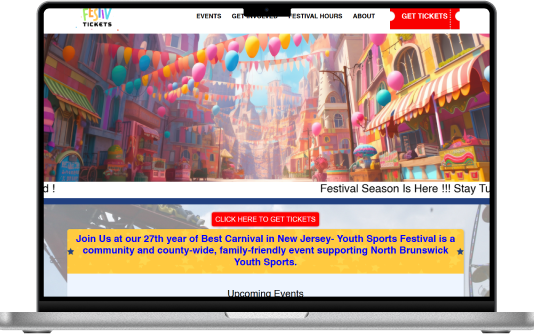
Events & ticketing
Festive Tickets
The case study covers event discovery, ticket purchasing, an organiser admin panel and mobile development.
Read the project story →Project visuals and descriptions from Akkenna’s existing portfolio. No performance figures are implied.
12 Questions
Frequently asked
What's the difference between website design and website development?
Design decides how the site looks, reads, and guides someone through it — research, wireframes, layout, typography. Development is how that decision gets built and actually runs in a browser — the frontend code, backend logic, and systems behind it.
Do you build on a CMS or from scratch?
Both, depending on the goal. A CMS makes sense when you'll be updating content yourself regularly. A custom-coded build makes sense when performance, specific interactions, or unusual functionality matter more than day-to-day editing.
Will the website work on mobile?
Yes — every build is responsive by default, tested across phone, tablet, and desktop breakpoints, not just shrunk down from a desktop design.
What's the difference between a static and a dynamic website?
A static site serves the same pre-built page to everyone — fast and simple, good for brochure-style sites. A dynamic site generates or updates content per request — needed for logins, dashboards, search, or frequently changing content.
How does AI fit into web design now?
Mainly in the workflow — faster first drafts of layout and copy, and content that's structured so AI search tools can read it accurately. It speeds up parts of the process; it doesn't replace deciding what the site should actually do for the people using it.
How it comes together
A clear path from brief to handover.
- STEP 01
Define the sitemap, content and functional requirements.
- STEP 02
Review design and develop the agreed website.
- STEP 03
Test key journeys and prepare a controlled launch.
Before we begin
Clear inputs. Fewer surprises.
What to bring to the conversation
Brand assets, approved content, domain and hosting arrangements and integration requirements.
You do not need a perfect brief. Start with what you know.What shapes the quote and timeline
Page types, custom functionality, content migration, integrations and ongoing support.
Scope and delivery dates are confirmed after reviewing the requirements—not promised before the brief.Let’s make a start
Tell us what you have in mind.
Share the challenge behind your website design & development project. We can then discuss the scope and the most useful next step.
- What does your business need to achieve?
- What do you already have in place?
- Is there a target launch date or budget range?
Read our privacy policy before sending your enquiry.
Website Design & Development · project enquiry
One connected team