What Is 3D Animation? Uses, Process & Cost for Businesses
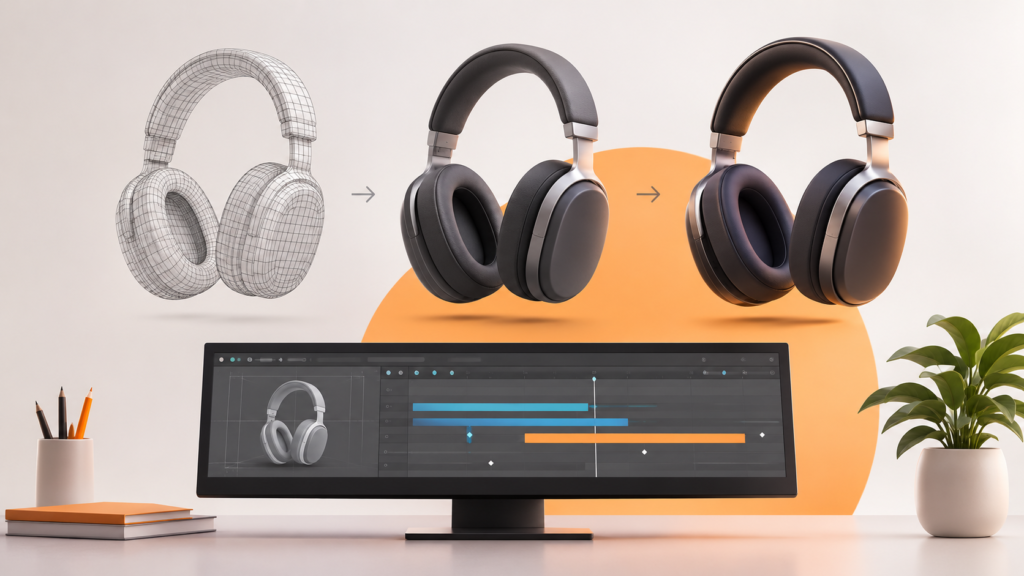
Some things are hard to show with a camera. A machine’s internal parts. A building that hasn’t been built. A product still in development. A medical process inside the body. A concept too complex for a flat drawing. 3D animation lets businesses show these things clearly, from any angle, in any setting, without a physical set or shoot.
It has also become more accessible. What was once reserved for film studios and large brands is now used by manufacturers, real estate developers, product companies, educators, healthcare organisations, and startups to explain, sell, and train.
This guide explains what 3D animation is, how it works, where businesses use it, how the production process runs, what affects the cost, how it compares with 2D animation, and how to decide whether it’s the right choice for your project.
What Is 3D Animation?
3D animation is the process of creating moving images using three-dimensional digital models. Instead of drawing flat images frame by frame, artists build objects and environments in 3D software, position them in virtual space, add materials and lighting, and animate them over time. The result is rendered into video.
Because objects exist in 3D space, you can rotate them, zoom in, move the camera, show cutaways, and display internal workings in ways that are difficult or impossible to film.
You may also see related terms:
- 3D visualisation: Often refers to still images or short animations that show a product or space realistically
- 3D rendering: The process of generating images from 3D models
- CGI (computer-generated imagery): A broad term for visuals created with computers
- 3D explainer video: An animated video using 3D visuals to explain a product, process, or idea
- Product animation: 3D video showcasing how a product looks and works
How Is 3D Animation Different From 2D Animation?
| Factor | 2D animation | 3D animation |
|---|---|---|
| Visual style | Flat, illustrated, graphic | Dimensional, realistic or stylised |
| Camera | Fixed or simulated movement | Free camera movement and angles |
| Best for | Concepts, services, software, brand storytelling | Products, machinery, spaces, technical detail, realism |
| Production effort | Illustration and animation | Modelling, texturing, rigging, lighting, rendering |
| Typical cost level | Generally lower for similar length | Generally higher, since models and rendering take time |
| Flexibility for reuse | Assets reusable within the style | 3D models can be reused for videos, images, and other formats |
Neither is better in all cases. A 2D explainer video is often a good fit for services, software, and abstract ideas, while a 3D explainer video suits physical products, technical systems, and anything where realism and depth matter. Many projects combine both, using 3D for product visuals and motion graphics for text, data, and branding.
Where Do Businesses Use 3D Animation?
Product demonstration and marketing
3D animation can show how a product looks from every angle, how parts fit together, and how it works, even before it’s manufactured. It’s popular for electronics, appliances, furniture, packaging, consumer goods, and industrial equipment. For physical products, it can be an alternative or complement to filming, and it pairs well with product demo videos that show real use.
Manufacturing and engineering
Companies use 3D animation to explain machinery, assembly processes, safety procedures, and technical specifications. Cutaways and exploded views help buyers and operators understand complex equipment quickly.
Real estate and architecture
Developers and architects use 3D visualisation and animated walkthroughs to show buildings, interiors, and amenities before construction is complete. This helps buyers imagine the space and supports sales and approvals. For more on promoting property projects, see [Real Estate Marketing Ideas That Generate Leads].
Healthcare and life sciences
3D animation can illustrate anatomy, procedures, and how treatments or devices work, which helps with patient education and professional training. Content should be accurate, clinician-reviewed, and compliant with advertising and professional rules.
Education and training
Complex concepts, processes, and safety training can be taught more effectively with visual, step-by-step animation. It’s useful for corporate training, technical education, and onboarding.
Technology and software
Where software connects to hardware or involves abstract systems, 3D animation can visualise data flows, networks, and infrastructure in a memorable way.
Advertising and brand films
Brands use 3D animation to create striking commercials, product reveals, and campaign visuals that would be expensive or impossible to film.
E-commerce and catalogues
3D models can be used for product images, 360-degree views, and interactive viewers, helping online shoppers see products in detail. Online sellers benefit from reliable e-commerce development that can display this kind of media well.
Events, exhibitions, and presentations
Animations can play on screens at trade shows, in sales presentations, and in showrooms, showing products and concepts when physical samples aren’t practical.
The 3D Animation Process, Step by Step
Professional 3D animation follows a structured pipeline.
1. Brief and goals
Define the purpose, audience, message, where the video will be used, desired length, and any technical or brand requirements. A clear brief reduces revisions later.
2. Script and concept
Write the script and decide how ideas will be shown visually. Strong scripts are concise and written for the ear, so the narration and visuals work together.
3. Storyboard and style frames
A storyboard sketches each scene, camera angle, and action. Style frames show the look and feel, including colour, lighting, and materials, so you can approve the direction before expensive work begins.
4. Reference gathering and asset preparation
Collect product drawings, CAD files, photos, dimensions, brand assets, and any other reference material the animators need. Accurate source materials improve accuracy and reduce rework.
5. 3D modelling
Artists build the 3D models of products, characters, or environments. Models may be created from scratch or converted from engineering files (CAD), and the level of detail depends on how close the camera gets.
6. Texturing and materials
Surfaces get colours, patterns, and material properties, such as metal, plastic, glass, fabric, or wood. Good materials make objects look realistic or stylised, depending on the goal.
7. Rigging
For objects or characters that need to move in complex ways, artists add a digital skeleton or control system that allows them to be animated.
8. Animation
Animators bring the models to life, defining how objects move, assemble, rotate, open, or interact, and how the camera travels through the scene. Timing is critical to keep the story clear and engaging.
9. Lighting and environment
Digital lights, backgrounds, and reflections set the mood and realism. Lighting choices influence how premium, clinical, warm, or dramatic the final video feels.
10. Rendering
The software calculates the final images frame by frame. Rendering can take significant computing time, particularly for realistic visuals and longer videos.
11. Compositing and motion graphics
Rendered footage is combined with text, graphics, logos, effects, and colour correction. Motion graphics add labels, callouts, and data visualisations.
12. Voiceover, music, and sound design
Narration, music, and sound effects bring the animation together. Clear audio is as important as visuals.
13. Review and revisions
You review drafts at agreed stages, such as storyboard, animatic, rough animation, and final render. Giving consolidated, clear feedback early saves time and cost.
14. Final delivery
The video is exported in the formats you need, such as widescreen, square, and vertical, with captions or subtitles where useful. Separate stills and short cuts can be created from the same assets.
How Much Does 3D Animation Cost?
3D animation costs vary widely, and there’s no single honest price. Published price guides differ enormously, and many come from providers selling the service. It’s more useful to understand what drives cost, so you can brief clearly and compare quotes fairly.
Factors that affect cost
- Video length. Longer videos need more animation and rendering time.
- Complexity of models. A simple product with clean geometry costs less to model than a detailed machine with hundreds of parts.
- Quality of visuals. Photorealistic rendering requires more modelling, texturing, lighting, and render time than a stylised look.
- Source materials. Having accurate CAD files and references can speed up modelling, while building from scratch takes longer.
- Number of scenes and environments. More locations and set pieces mean more assets.
- Characters and rigging. Characters or complex moving parts require rigging and detailed animation.
- Camera work and animation complexity. Elaborate camera moves, simulations, and effects take longer.
- Script and creative development. Writing, storyboarding, and style development add time if you need support.
- Voiceover and music. Professional voice artists, multiple languages, and licensed music add cost.
- Revisions. Extra rounds beyond the quoted number add time. Changes after rendering are costly, so approve early stages carefully.
- Number of versions and formats. Social cuts, subtitles, and translations require extra work.
- Turnaround time. Rush projects usually cost more.
- Who produces it. Freelancers, small studios, and large agencies price differently and offer different levels of creative direction and project management.
Common pricing models
- Per-minute or per-second: Common in animation, since each finished second needs modelling and animation
- Fixed project fee: A set price for a defined scope
- Per-asset pricing: Charges for each model, scene, or deliverable
- Package pricing: Bundles that include scripting, voiceover, and revisions
- Retainer: For ongoing needs, such as regular product launches or content series
How to get a useful quote
- Share your goal, audience, desired length, and where the video will run
- Provide references, CAD files, and brand guidelines if available
- Say whether you need scripting, voiceover, music, subtitles, and extra formats
- Ask how many revision rounds are included, and what extra rounds cost
- Ask about rendering, file formats, and ownership of the 3D models and project files
- Request itemised quotes so you can compare like with like
For a broader view of how video pricing works, see [How Much Does Video Production Cost? What Actually Drives the Price].
Benefits of 3D Animation for Businesses
- Shows the unseeable. Internal parts, future buildings, and complex processes become visible.
- Reduces the need for physical shoots. No samples, sets, or locations are required.
- Supports flexibility. Models can be reused to create multiple videos, images, and updates.
- Improves understanding. Dimensional views help people grasp how things fit and work.
- Makes products look their best. You control lighting, angles, and presentation.
- Updates can be simpler. When a product changes, you can modify the model instead of reshooting everything.
- Supports sales and training. Clear visuals can help buyers decide and employees learn.
Limitations to Consider
- Higher production effort. It generally takes more time and skill than simpler animation styles.
- Needs good source materials. Accurate references and files make a big difference.
- Can feel cold if overdone. Pure technical visuals may need human elements or narration to connect emotionally.
- Rendering takes time. Complex scenes can require long rendering periods.
- Revisions are best made early. Late changes can be costly.
- Not always necessary. For abstract concepts or services, 2D or whiteboard styles may be more effective and economical. See [What Is Whiteboard Animation? Cost, Uses & Examples] for one lighter-weight option.
How to Decide If 3D Animation Is Right for You
3D animation tends to be a strong choice when:
- You’re showing a physical product, machine, or space
- The product isn’t built yet, or is hard to film
- You need to show internal parts or processes
- You want consistent, high-quality visuals across many assets
- You want to reuse models for different formats
Consider alternatives when:
- You’re explaining an abstract idea, service, or software concept
- Your budget or timeline is tight
- You want authentic, people-led stories and testimonials
- A live-action shoot is simple and affordable
A mixed approach often works best, such as 3D for the product, motion graphics for the benefits, and creator-style UGC videos for real customer voices.
How to Get the Best Results From a 3D Animation Project
- Define the goal and audience clearly. What should viewers understand or do afterwards?
- Keep the story simple. One main message works better than many.
- Prepare accurate references. Share drawings, CAD files, product specs, and brand assets early.
- Approve the storyboard and style frames carefully. Changes are cheaper before modelling and rendering.
- Keep it on brand. Colours, fonts, tone, and logos should match your identity. A defined brand identity and consistent graphic design help the animation feel like part of your brand.
- Consolidate feedback. Collect comments from all stakeholders and share them together.
- Plan for multiple formats. Decide upfront whether you need vertical or square cuts for social media.
- Plan distribution. A great animation needs the right audience.
Where to Use Your 3D Animation
- Website: Place it on your homepage, product, or service pages. Good web design and development ensures video loads quickly and sits where visitors will see it.
- Social media: Share short cuts with captions. Consistent social media marketing helps animations reach more people.
- Paid campaigns: Product reveals and short clips make strong ad creative. Structured performance marketing helps you test which cuts perform best.
- Sales presentations and exhibitions: Show products and processes where physical samples aren’t practical.
- Training and onboarding: Use animation to teach processes and safety procedures.
- Email and outreach: Include a thumbnail and link to explain your offer quickly.
A documented content strategy helps you plan how animation fits with your other content and where it will be most useful.
Common Mistakes With 3D Animation
- Starting without a clear brief. It leads to rework and delays.
- Choosing 3D when 2D would do. Match the style to the message.
- Providing poor source files. Inaccurate references cause errors and extra cost.
- Trying to show everything. Focus on what viewers need to see.
- Approving late. Changes after rendering are expensive.
- Ignoring the story. Impressive visuals still need a clear message and call to action.
- Skipping audio quality. Poor narration can undermine great visuals.
- Not planning formats. You may need vertical or short versions later.
- Not clarifying ownership. Agree who owns the models and source files.
- Not planning distribution. An unseen video delivers no return.
A Quick Checklist Before You Commission 3D Animation
- Clear goal, audience, and message
- Style chosen: realistic, stylised, or mixed
- Accurate references and files gathered
- Script, or support for writing it
- Length, versions, and formats agreed
- Voiceover, music, and subtitles decided
- Storyboard and style frames approval process set
- Revision rounds, timeline, and rendering milestones confirmed
- Itemised quote with inclusions and exclusions
- Ownership of models and project files agreed
- Distribution and measurement plan ready
Final Thought
3D animation lets businesses show what cameras can’t: products before they exist, machines from the inside, spaces before they’re built, and processes step by step. It’s most effective when it serves a clear message, uses accurate source material, and is planned for the places where people will watch it. Understand what drives the cost, choose the style that fits your goal, and plan your approvals carefully so the final result is worth the investment.
If you’d like help with 3D explainers, product visualisation, or animation that fits your brand and goals, talk to Akkenna.
FAQ
What is 3D animation? 3D animation is the creation of moving images using three-dimensional digital models that are built, textured, animated, lit, and rendered into video. It lets you show objects and spaces from any angle.
What is 3D animation used for in business? Businesses use it for product demonstrations, manufacturing and engineering explanations, real estate and architectural visualisation, healthcare and education, advertising, e-commerce visuals, and training.
How much does 3D animation cost? There’s no single price. Cost depends on video length, model complexity, visual quality, source materials, scenes, voiceover, revisions, formats, and turnaround. Request itemised quotes based on your scope.
What is the difference between 2D and 3D animation? 2D animation uses flat, illustrated visuals, while 3D uses dimensional models that can be viewed from any angle. 3D suits physical products and technical detail, while 2D often suits abstract concepts and services.
How long does 3D animation take to make? It depends on length, complexity, and review speed. Modelling, animation, rendering, and revisions all take time, so agree a schedule with your provider upfront.
What do I need to provide to start a 3D animation project? A clear brief, a script or key messages, product drawings or CAD files, photos, brand assets, and details of where the video will be used.
Can 3D animation be used for products that don’t exist yet? Yes. 3D models can show prototypes or planned products and spaces, which is useful for pre-launch marketing, fundraising, and approvals.
Do I own the 3D models after the project? It depends on the agreement. Clarify ownership and usage rights for models, project files, and final videos with your provider before starting.
