Bespoke software · Coimbatore

Custom software.
Built around your business.

Web applications, internal systems and integrations shaped around your requirements.

Bring the process that needs attention: enquiries, quotations, bookings, approvals, reporting or the handover between teams. Akkenna helps turn it into a defined application scope with clear screens, rules and delivery stages.

Win Energie project website displayed in a laptop mockup
Win EnergieCustom CRM · Quotation and installer workflows
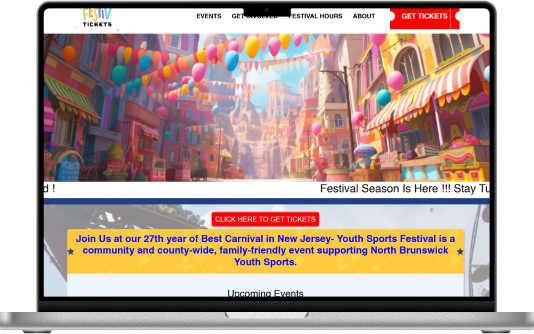
Festive Tickets website displayed in a laptop mockup
Festive TicketsEvent discovery, booking and organiser tools.
  • Custom web applications
  • CRM and internal tools
  • Portals and integrations
  • Based in Peelamedu, Coimbatore

Selected Akkenna projects

Different businesses. Specific software requirements.

Explore two published projects to see how business rules become working interfaces. Each project below links to its existing portfolio story.

Win Energie project website displayed in a laptop mockup
Win Energie · A published Akkenna project
Custom CRM · Energy services

Win Energie: Connect businesses, installers and quotation workflows.

Win Energie needed a platform for businesses seeking installation services connected with the Energy Saving Certificates process. Akkenna’s published case study describes a custom CRM with installer matching, quotation tools, administrator capabilities and shared documentation.

The requirement

Bring enquiries, provider selection and supporting information into a coordinated workflow.

What the project includes

  • Tools for obtaining and comparing service-provider quotations
  • Installer search and business-to-business matching
  • Administrator and customer roles with different quotation rules
  • Centralised documentation and data storage

The useful detail is the business logic: who provides information, who can see it and how a quotation changes between roles.

Explore the Win Energie Project
Festive Tickets website displayed in a laptop mockup
Festive Tickets · A published Akkenna project
Ticketing · Web and mobile

Festive Tickets: Connect event discovery with the booking journey.

Festive Tickets is an Akkenna project covering event discovery, ticket purchasing and organiser tools. The published website and app service pages describe the connected web and mobile work, including iOS and Android development using Flutter.

The requirement

Serve the people finding events and the organisers managing bookings within a connected product.

What the project includes

  • An event discovery and ticket-purchasing journey
  • An organiser administration panel
  • Connected website and mobile application work

A booking product has more than one audience. Customer screens and operational tools need to be planned together.

Explore the Festive Tickets Project

Start with the work

Which part of the day needs a better system?

A useful software brief starts with a repeated task, a decision or a missing handover. These are example starting points to discuss, rather than additional client case studies.

Illustrative starting point

Enquiries are scattered across spreadsheets and messages.

A possible workflow

Capture enquiry → assign owner → record next action → review status.

What we could scope

Lead workspace, ownership rules, reminders and a status dashboard.

Illustrative starting point

Every quote is recreated from an old document.

A possible workflow

Choose customer → enter requirements → calculate agreed rules → approve → issue.

What we could scope

A quotation builder, approval steps and document templates.

Illustrative starting point

Customers contact the team for every progress update.

A possible workflow

Sign in → see the relevant request → upload information → track the next step.

What we could scope

A customer portal with permissions and an agreed notification flow.

Illustrative starting point

The same information is entered into several systems.

A possible workflow

Validate the source → transfer agreed fields → record failures → reconcile.

What we could scope

An integration with clear ownership, error handling and reporting.

Discovery establishes which part is worth building first and which existing tools can remain.

What we can build

A clear application scope, with the details included.

Choose the capabilities your workflow needs. Features are agreed individually; every project does not need the same platform or package.

Web applications and portals

Give staff, customers or partners the screens they need for their role.

  • User journeys and screen list
  • Forms, tables and status views
  • Access and permission rules

CRM and internal workspaces

Organise enquiries, quotations, assignments and operational follow-up.

  • Records and relationship map
  • Stages and ownership
  • Search, filters and agreed reports

Booking and transaction systems

Define the complete journey around a reservation, order or other transaction.

  • Availability or catalogue rules
  • Confirmation and exception states
  • Administration screens

Dashboards and reporting

Make the information behind a decision easier to inspect and use.

  • Metric definitions and data sources
  • Role-specific views
  • Exports and refresh expectations

APIs and integrations

Connect applications through the interfaces the existing systems support.

  • Field mapping
  • Authentication approach
  • Failure and reconciliation handling

Existing-system improvement

Assess a working application before deciding what to repair, extend or replace.

  • Current-state review
  • Migration or enhancement scope
  • Staged transition plan

How the project moves

Reviewable stages from the first workflow to release.

Each stage should finish with something your team can inspect. The sequence, dates and responsibilities are confirmed in the project scope.

  1. Map the current process

    Walk through a real example of the work, including exceptions. Identify the people, records and systems involved.

    Reviewable outputWorkflow map, users, pain points and business priorities.

  2. Define the first useful release

    Agree the essential features and what can follow later. Identify decisions that depend on external systems or data.

    Reviewable outputFeature scope, dependencies, assumptions and acceptance criteria.

  3. Design the screens and rules

    Review how a user moves through the application before every screen is built. Resolve forms, permissions and important error states.

    Reviewable outputUser flows, screen designs and agreed business rules.

  4. Build in reviewable stages

    Develop the agreed functions and show working progress against the scope. Keep questions and changes in a shared decision record.

    Reviewable outputDemonstrable features and a prioritised feedback list.

  5. Test with the people using it

    Check the main tasks, access rules and failure scenarios using representative test data. Record what must be fixed before release.

    Reviewable outputTest results, reviewed issues and release acceptance.

  6. Prepare release and support

    Plan deployment, operational access, handover and the support arrangement. Make ownership and recurring services clear.

    Reviewable outputRelease checklist, handover material and agreed support responsibilities.

The work behind the screens

Plan the data, permissions and connections early.

A polished interface still needs dependable rules underneath it. Before implementation, we discuss how the application will receive information, what it may change and how your team will handle exceptions.

Connections

  • Which system owns each piece of information?
  • Does it provide a usable API or export?
  • How will failed updates be retried or reconciled?

Data and access

  • What information is necessary for each task?
  • Which roles may view, edit or approve it?
  • What retention and audit requirements apply?

Operating the application

  • Who manages hosting and external accounts?
  • How are backups and recovery checked?
  • What support hours and response arrangements are required?

Example integration discussion

  1. Source system
  2. Validation and mapping
  3. Application records
  4. Role-based screens

Failed transfers need a visible review and reconciliation path.

Healthcare and other sensitive workflows require access, data handling and organisational requirements to be defined for the specific application.

Requirements by business type

The workflow changes with the business.

These scenarios show what a discovery conversation might cover. They are potential scopes, not claims of delivered projects in every industry.

Jewellery and retail

Product catalogues, enquiries, quotations and links between store operations and online orders.

Which details vary by product, customer or location?

Healthcare and clinics

Appointment administration, enquiry routing and authorised staff workflows.

What information can each role access, and what must remain in existing clinical systems?

Rehab and recovery

Administrative intake, admissions tasks and controlled document workflows.

Where are consent, access restrictions and human decisions required?

Hospitality and services

Bookings, availability, service requests and staff coordination.

What happens when a booking changes, a resource is unavailable or a request needs escalation?

E-commerce and wholesale

Catalogue operations, customer accounts, pricing rules, orders and document generation.

Which rules belong in the storefront and which belong in the operational system?

Fitness and wellness

Membership administration, class schedules and attendance workflows.

How do plans, schedules and exceptions affect the daily work?

A useful brief

Know what shapes the quote and the delivery plan.

Share what you already have. A rough process diagram, sample spreadsheet or walkthrough is enough to begin discussing the requirements. Use sample or redacted data at this stage.

Scope factorWhy it mattersWhat to bring
Users and roles

Different permissions and approval paths add rules that must be designed and tested.

Who will use the application and what each person needs to do.

Features and exceptions

An everyday path and its unusual cases both affect scope.

A normal task plus examples of when it goes wrong or changes.

Integrations

External access, API limits and vendor support can affect the build.

The systems to connect and any available documentation.

Existing data

Migration depends on its format, quality and history.

A redacted sample and an approximate record count.

Release and support

Hosting, rollout, training and maintenance need explicit ownership.

A preferred launch window and the team responsible after release.

The proposal should separate the initial build, external subscriptions, hosting and ongoing support. Delivery dates follow the agreed scope and dependencies.

Questions before a build

Make the important decisions before development.

Scope, ownership, integration and support deserve clear answers from the outset.

When should we choose custom software?

Consider it when an important workflow has requirements your current tools cannot meet sensibly. Start by defining the problem and comparing configuration, integration and a custom build. A familiar existing tool may still handle part of the process well.

Can we start with one module?

Yes. A first release can focus on an agreed workflow or group of users. Define its inputs, outputs and success criteria, then identify how later modules would connect. The scope should state what is included now and what remains for a later phase.

Can you connect it to our existing website or software?

That depends on the available interfaces and access. Share the platforms, API documentation and data that need to move between them. The proposal can then identify supported connections, manual steps and any vendor dependencies.

What do you need from our team?

A person who understands the workflow, a decision-maker for the scope and users who can review the screens. Sample documents, redacted data and examples of exceptions make the requirements more concrete.

How are changes handled after the scope is agreed?

Record the requested change and assess its effect on effort, dependencies and release plans. Agree whether it belongs in the current phase or a later release before additional work starts.

Who owns the application and its accounts?

Agree source-code ownership, access, handover and usage rights in the contract. Hosting and other service accounts need named owners. Third-party software and subscriptions retain their own licence terms.

What happens after launch?

Agree the maintenance and support scope before release. It can cover issue handling, updates and planned enhancements, with clear responsibilities for hosting and external services. Response times and coverage should be specified in that arrangement.

Can you give a fixed price and timeline immediately?

A useful estimate needs a defined feature scope, integrations and responsibilities. Share your budget range and target date early; we can discuss which release scope fits them and what still needs investigation.

Start with a conversation

Show us the workflow you want to improve.

Tell us what the team does today, where the process slows down and what a better working day would look like. We can use that conversation to define the next useful step.

Use a sample or redacted document for the first conversation.

A useful first message

  1. What are you building or improving?
  2. Who will use it?
  3. Which systems does it need to connect with?
  4. Is there a target date or budget range?

Enquiry submitted

Thanks for contacting Akkenna. Our team will be in touch soon.