How to Create Product Review Videos: A Step-by-Step Guide
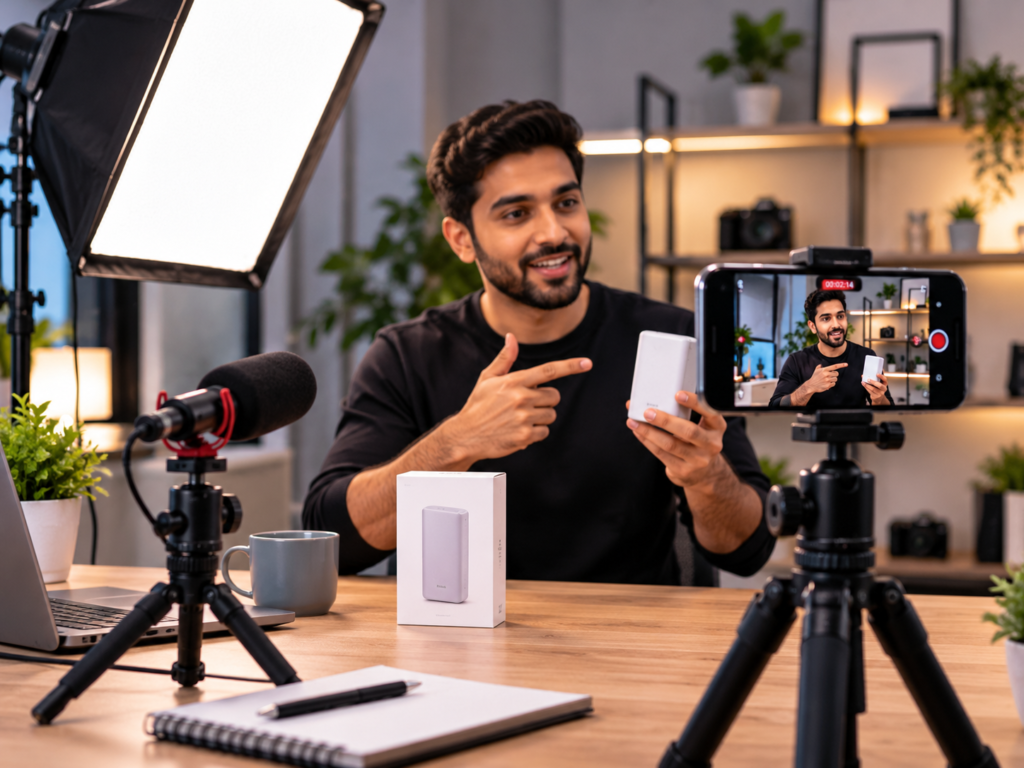
Before buying something, most people look for proof that it works. They read comments, scan ratings, and, more and more, watch someone use the product on video. A good product review video answers the questions a product page can’t: how big is it really, how does it feel in use, what are the downsides, and is it worth the price?
That makes review videos useful for two groups. Creators and reviewers make them to help viewers decide. Brands make or commission them to build trust, show products honestly, and give shoppers the confidence to buy.
This guide explains how to create product review videos that are clear, credible, and useful, from choosing the format and planning the content to filming, editing, disclosing partnerships, and publishing. It covers reviews made by brands, by customers, and by creators.
What Is a Product Review Video?
A product review video is a video in which someone shares their experience of a product and gives an opinion on it. A good review typically includes:
- What the product is and who it’s for
- How it looks, feels, and works in real use
- What’s good about it
- What’s not so good
- How it compares with alternatives
- A conclusion on whether it’s worth buying
It differs from a product demo video, which mainly shows how a product works. A demo explains and showcases. A review evaluates and gives a view. Many brands use both: demos to explain features and reviews to build trust.
Why Product Review Videos Work
- They build trust. Seeing a real person use a product and talk about it feels more credible than polished ad copy.
- They reduce uncertainty. Viewers can see size, finish, performance, and quirks before they buy.
- They answer real questions. Reviews cover practical details like fit, durability, setup, and value.
- They support the buying decision. People often watch reviews at the consideration stage, just before purchasing.
- They’re reusable. A single review can be used on product pages, social media, email, ads, and YouTube.
They only work if they’re honest. Viewers can spot a review that reads like an advertisement, and trust is hard to win back once lost.
Types of Product Review Videos
Choose a format that suits who’s making the video and what you want it to achieve.
Brand-made reviews
Your team reviews your own products, often in a structured way. This works best when it’s transparent and detailed, such as explaining what the product is great for, who it suits, and who it doesn’t suit. Be clear that it comes from the brand.
Customer review videos
Real customers talk about their experience. These feel authentic and can be collected through follow-up requests, communities, and campaigns. With permission, they can be reused across your channels.
Creator and influencer reviews
Independent creators review your product for their audience, either organically or as part of a paid or gifted collaboration. Their audience trusts their opinion, so fit and honesty matter. Creator-style UGC videos are a common way for brands to get review-style content at scale for ads and social channels.
Unboxing videos
Show the packaging, contents, and first impressions. They work well for gadgets, beauty, fashion, and gifting.
Comparison reviews
Compare two or more products across features, price, and performance. These can be very useful for shoppers who are choosing between options, but they need to be fair and accurate.
Long-term or “after X weeks” reviews
Share how a product holds up after extended use. These are especially valuable for durable goods, since they address wear, reliability, and real value.
Roundup or “best of” reviews
Cover several products in a category with a recommendation for each use case.
Step 1: Define the Goal and the Viewer
Be clear about what the video should achieve and who will watch it:
- Goal: Help shoppers decide, build brand trust, support a launch, reduce returns, or create ad content?
- Viewer: First-time buyers, people comparing options, or existing customers wanting tips?
- Where it will be shown: Product page, YouTube, social feed, email, or ads?
A review for a product page may focus on practical details, while one for social media may need a faster, more personality-led style.
Step 2: Choose the Product and Angle
Pick a product that your audience actually wonders about, such as a bestseller, a new release, or something people frequently ask questions about. Then choose an angle:
- “Is it worth it?” a straightforward verdict
- “Who is this for?” matching the product to different buyers
- “Honest first impressions”
- “After 30 days”
- “Product A vs Product B”
- “Everything you need to know before buying”
A clear angle makes the video easier to plan and easier for viewers to find and understand.
Step 3: Research and Test the Product Properly
Credibility comes from real use. Before filming:
- Use the product for long enough to form an informed view
- Test key features and, where relevant, compare with alternatives
- Note specifics: dimensions, materials, battery life, setup time, performance, and quality
- Collect pros and cons as you go
- Check claims against what the product actually does
- Gather customer questions from comments, reviews, and support messages
Notes taken during real use usually produce a more convincing review than something written from a spec sheet.
Step 4: Plan the Structure and Script
A simple structure keeps viewers engaged:
- Hook: Open with the main question or finding. “I tested this for two weeks, and here’s what surprised me.”
- Intro: What the product is, who it’s for, and why you’re reviewing it.
- First impressions: Packaging, design, and build quality.
- Performance in use: Demonstrate real use cases and results.
- Pros: What works well.
- Cons: What doesn’t, or what to consider.
- Comparison or context: How it stacks up against alternatives or price.
- Verdict: Who should buy it and who shouldn’t.
- Call to action: A link, a follow, a subscription, or a nudge to check the product page.
You don’t need to script every word, but plan key points, transitions, and the verdict. Speaking from bullet points often sounds more natural than reading a script.
Step 5: Be Honest and Fair
Honesty is what makes review videos work. Some principles:
- Include real drawbacks. A review with no cons feels like an ad.
- Be specific. “The battery lasted about a day of heavy use” is more helpful than “the battery is great.”
- Separate facts from opinion. State measurable details clearly and label personal views as such.
- Be fair to competitors. Don’t make claims you can’t support.
- Don’t fake or script customer reviews. Misleading reviews can breach platform rules and consumer protection law and damage trust.
If you’re a brand reviewing your own product, say so. Honest framing, such as “here’s who this is best for,” often builds more trust than claiming it’s perfect for everyone.
Step 6: Handle Disclosure and Compliance
If you receive free products, payment, commissions, or other benefits, disclose it clearly. Platforms require disclosure for paid partnerships, and many countries have rules about endorsements and misleading reviews. In India, bodies such as ASCI have published influencer disclosure guidelines, and consumer protection rules address misleading advertising and fake reviews. Rules change, so check the current requirements for your platform and category, and take advice if you’re unsure.
Practical habits:
- Use the platform’s paid-partnership label where available
- State the relationship clearly in the video and the description
- Avoid exaggerated or unsubstantiated claims, especially for health, beauty, and finance products
- Get permission before using customer footage or likenesses in marketing
Step 7: Set Up Your Filming Space
You don’t need a studio. A clean, well-lit space and good audio are the basics.
- Camera: A modern smartphone is enough. Film in the highest quality available, and use a tripod or stand.
- Lighting: Use soft natural light from a window or a simple softbox. Avoid harsh overhead lighting and strong reflections on shiny products.
- Audio: A clip-on or small shotgun microphone makes a big difference. Record in a quiet room with minimal echo.
- Background: Keep it tidy and relevant. A simple, uncluttered setting keeps focus on the product.
- Product preparation: Clean the product, prepare spares, and arrange accessories.
Step 8: Film With the Viewer in Mind
- Show the product clearly. Use close-ups for details such as texture, stitching, ports, or controls.
- Show scale. Hold it, wear it, or place it next to familiar objects.
- Demonstrate real use. Show it in the setting where people will actually use it.
- Vary your shots. Mix wide, medium, and close-up shots to keep things interesting.
- Talk to the camera naturally. Speak the way you would to a friend asking for advice.
- Capture extra footage. Record cutaways and alternate takes for editing.
- Film vertically and horizontally if needed. Vertical suits Reels and Shorts, while horizontal suits YouTube and websites.
Step 9: Edit for Clarity and Pace
Editing should make the review easier to follow, not flashier.
- Cut the filler. Remove pauses, repetition, and tangents.
- Add on-screen text for key specs, pros and cons, and the verdict.
- Add captions. Many viewers watch without sound.
- Use B-roll to illustrate what you’re describing.
- Show comparisons visually. Split screens or simple graphics help viewers see differences.
- Keep audio clean. Balance voice and music, and keep music subtle.
- Use chapters or timestamps for longer videos, so viewers can jump to the section they care about.
- Design a clear thumbnail that shows the product and a simple hook.
Reusable titles, captions, and end screens in your brand style keep your videos consistent. A defined brand identity and templates built with graphic design save time across a series. For specs, pros-and-cons panels, and comparison visuals, simple motion graphics can make information easier to absorb.
Step 10: Choose the Right Length
Length depends on the platform and the product.
- Short (under a minute or so): Good for social media and ads, focused on one verdict or one feature.
- Medium (a few minutes): Suits product pages and YouTube, covering the main points.
- Long (ten minutes or more): Suits detailed reviews of complex or high-value products.
As a rule, cover what viewers need and cut the rest. If you have several audiences, make a short version and a detailed version.
Step 11: Publish Where It Helps Buyers
Place review videos where people make decisions.
- Product pages: One of the most effective places. Make sure the page loads quickly and the video is easy to find. Well-built e-commerce development and web design and development let you embed video without slowing down the page.
- YouTube: Useful for search visibility. Use a clear title, a detailed description, and chapters.
- Social media: Share short cuts with captions. Regular social media marketing helps keep reviews circulating alongside other content.
- Email: Feature a review in launch, nurture, or post-purchase emails.
- Ads: Review-style clips often make strong ad creative, especially when they feel authentic. Structured performance marketing helps you test which cuts and messages perform best.
- Sales and support: Share them with prospects and customers who have questions.
A documented content strategy can help you plan a pipeline of review content, such as a review for each key product, a comparison for each category, and customer reviews for each launch.
Step 12: Encourage and Collect Customer Review Videos
Customer review videos are often the most trusted content you can have. To get more of them:
- Ask after purchase, once the customer has had time to use the product.
- Make it easy. Provide a simple upload link and a few prompts.
- Offer guidance. Suggest what to talk about, such as what they liked and how they use it, without scripting their opinion.
- Respect honesty. Don’t pressure customers to leave only positive reviews or to edit out criticism.
- Get permission to reuse their content, and credit them.
- Thank them, and respond to what they share.
Incentives are allowed in some contexts but must be disclosed and not tied to positive reviews. Check platform and legal rules first.
Step 13: Measure and Improve
Track whether your review videos are doing their job.
| Goal | Useful measures |
|---|---|
| Awareness | Views, reach, watch time |
| Engagement | Retention, comments, shares, saves |
| Interest | Clicks to product pages, add-to-cart rate |
| Conversion | Purchases after viewing, conversion rate on pages with video |
| Trust | Review quality, questions answered, return rate |
| Support | Fewer repeat pre-sales questions |
Watch where viewers drop off, read the comments for new questions, and use them to plan your next video. Update or replace reviews when the product changes.
Product Review Video Ideas by Category
- Fashion and accessories: Fit and sizing on different body types, fabric feel, wash tests, and styling ideas.
- Beauty and personal care: Application, wear time, skin-type notes, and honest results, with careful claims.
- Gadgets and electronics: Setup, real-world performance, battery, and comparisons.
- Home and kitchen: Use in real tasks, cleaning, durability, and value for money.
- Food and beverages: Taste, texture, ingredients, and serving ideas.
- Software and apps: Hands-on use, strengths, limitations, and who it suits.
- Fitness and wellness: Long-term use, comfort, and results over time.
For more on promoting products, see [How to Advertise a Product on Social Media: A Practical Step-by-Step Guide].
Common Mistakes When Creating Product Review Videos
- Making it sound like an ad. Viewers want a balanced opinion.
- Leaving out the downsides. Credibility needs honesty.
- Not using the product enough. Shallow reviews lack useful detail.
- Skipping disclosure. It can breach rules and harm trust.
- Poor audio and lighting. They make a review feel amateur.
- Rambling. Plan the structure and cut the filler.
- Being vague. Give specifics, such as measurements, times, and examples.
- Ignoring viewer questions. Use comments and customer queries to guide topics.
- Faking or incentivising dishonest reviews. It risks legal and reputational damage.
- Forgetting a call to action. Tell viewers where to find the product or learn more.
- Not updating. Outdated reviews of changed products mislead viewers.
A Quick Product Review Video Checklist
- Goal, viewer, and platform defined
- Product tested properly, with notes on pros and cons
- Angle and structure planned
- Honest, specific, fair content
- Disclosure and compliance checked
- Clean audio, good lighting, tidy background
- Product shown clearly in real use
- Tight edit with captions and on-screen text
- On-brand titles and thumbnail
- Published on key pages and channels
- Measurement and update plan in place
Final Thought
The best product review videos feel like advice from someone you trust: specific, balanced, and genuinely useful. Test the product properly, be honest about strengths and weaknesses, show it in real use, and make it easy for viewers to take the next step.
If you’d like help creating review-style content, product videos, or a video plan that fits your brand, talk to Akkenna.
FAQ
How do I create a product review video? Define your goal and viewer, choose the product and angle, test it properly, plan a clear structure, film with good audio and lighting, show the product in real use, give an honest verdict, edit with captions, and publish where buyers will see it.
What should a product review video include? An introduction, first impressions, real-use performance, pros and cons, comparison or context, a clear verdict on who it suits, and a call to action.
How long should a product review video be? It depends on the platform and product. Short clips suit social media, a few minutes suits product pages, and longer videos suit complex or high-value products. Cover what viewers need and cut the rest.
Do I need to disclose free products or paid reviews? Yes. Disclose gifts, payment, or other benefits clearly, using platform tools where available, and follow local advertising and consumer-protection rules.
Can brands make reviews of their own products? Yes, if it’s clear that the review comes from the brand and it’s honest about who the product suits. Customer and creator reviews often carry more independent credibility.
How do I get customers to make review videos? Ask after purchase, make it easy to upload, offer guidance without scripting opinions, get permission to reuse content, and thank them. Don’t pressure customers into leaving only positive reviews.
What equipment do I need for product review videos? A smartphone or camera, a tripod, a microphone, good lighting, and editing software are enough to start.
What is the difference between a product review and a product demo video? A demo shows how a product works, while a review evaluates it and shares an opinion, including strengths and weaknesses. Many brands use both.
